Reply Building
Note
All event types share the same Reply API. JDA-Commands will only acknowledge the interaction event just before sending the reply. If you need more time, e.g. for doing a database query, you can always manually acknowledge events by calling event#deferReply().
Localization and Placeholders
To avoid hardcoded values, all string properties of a component/the content of a message can be replaced by a localization key as supported by the current used Localization System.
Furthermore, it's possible to directly use placeholders. For more information on how to use placeholders please visit this page.
Also take a look at the general message resolution documentation.
Unicode and application emojis
JDA-Commands has built in support for Unicode and application emoji aliases. If you want to use them, just take a look here.
Text Messages
The simplest way of sending a reply is using the ReplyableEvent#reply(String, Entry...)
method. This will send a non-ephemeral text message. If the event has already been replied to, this method will edit the
original message instead of sending a new one by default.
The reply() method also has some useful overloads, you can find a full list here.
Reply Configuration
You can change the default reply behavior by calling ReplyableEvent#with()
before sending the reply. This will return a ConfigurableReply
object to you, you can use to modify settings:
When calling ComponentEvent#with() you get a EditableConfigurableReply which allows for even more settings:
editReply(boolean): This will send a new message instead of editing the original one.keepComponents(boolean): This will keep the original componentskeepSelections(boolean): This will keep the user selections of the original components
Action Components
Replying with Action Components
The ConfigurableReply
object is also used to attach components. You reference action components by the name of the method they are defined with, just
like we did before with modals.
Example
@Command("greet")
public void onCommand(CommandEvent event) {
    event.with().components("onButton").reply("Hello World!"); //(1)!
}

@Button("Greet me!")
public void onButton(ButtonEvent event) {
    event.reply("Hello %s".formatted(event.getUser().getAsMention()));
}
- We reference the Button we want to send via the method name.
You can also omit the text message and only send the component by calling reply() with no arguments.
Action Rows
Every call to components() will create a new action row. If you want more than one action row you need to call
components() multiple times.
If you want to add multiple action components to the same action row, just pass the method names to the same components() call.
Note
One action row supports up to 5 buttons but only 1 select menu.
Enabling & Disabling
By default, all action components are enabled. If you want to attach a disabled action component, you need to wrap it by calling
Component#disabled(String, Entry...)
If you want to add multiple action components to the same action row, with some of them enabled and some disabled, you need to wrap all of them.
Example
Keeping Components
When working with components and especially when building menus, e.g. a pagination with buttons, it is often needed to keep the components attached, even when editing the original message multiple times.
Normally, Discord would remove any components when sending a message edit, unless they are explicitly reattached.
JDA-Commands flips this behavior and will keep your components attached by default.
You can disable this by calling keepComponents(false):
Alternatively you can call ComponentEvent#removeComponents() which will remove all action components attached to a message.
Note
When using Components V2 calling ComponentEvent#removeComponents() will throw an UnsupportedOperationException because this would result
in an empty message.
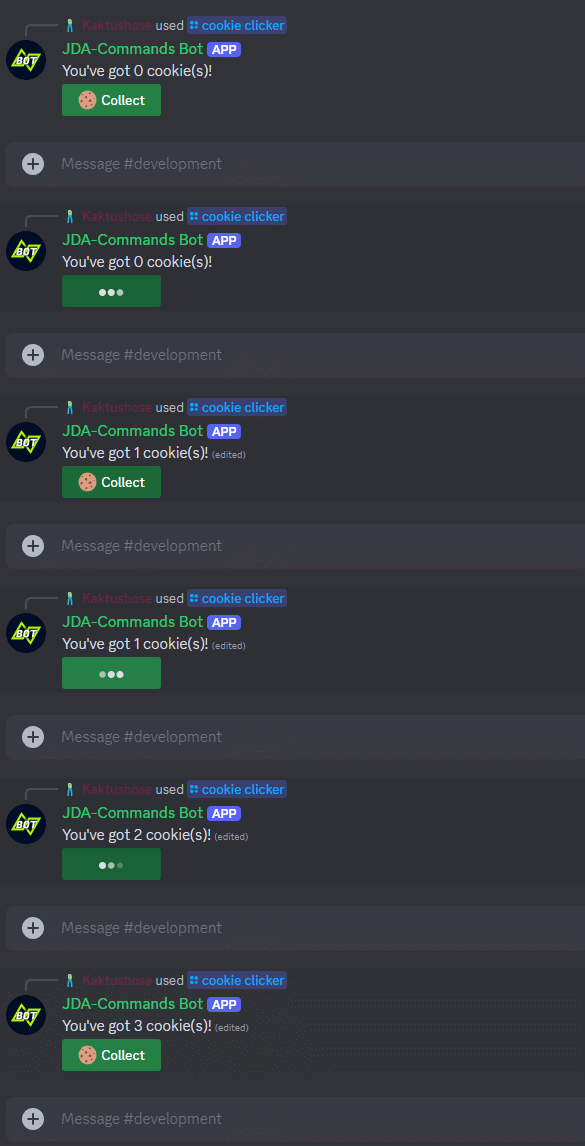
Cookie Clicker Example
@Interaction
public class CookieClicker {

    private int counter;

    @Command(value = "cookie clicker", desc = "Play cookie clicker")
    public void onClicker(CommandEvent event) {
        event.with().components("onCookie").reply("You've got { $count } cookie(s)!", entry("count", counter));
    }

    @Button(value = "Collect", emoji = "🍪", style = ButtonStyle.SUCCESS)
    public void onCookie(ComponentEvent event) {
        event.reply("You've got { $count } cookie(s)!", entry("count", counter++));
    }
}
Keeping Selections
By default, JDA-Commands will also retain the selections of select menus when sending a reply with keepComponents set
to true. You can disable this by calling keepSelections(false):
!!! example
Foreign Components
You can attach action components that were defined in a different class by using the Component#enabled(Class, String, Entry...)
class again. In addition to the method name, you must also pass the class reference in that case.
Example
The foreign action component will use the original Runtime just like any other action component would. If no
instance of the class the action component is defined in (ButtonHelpers in the example above) exists yet,
the Runtime will create one instance (and store it for potential future method calls).
Lifetime
As discussed earlier, Runtimes have a limited lifetime. By default, JDA-Commands will close a Runtime after 15 minutes of no activity have passed.
Component Lifetime
This means all action components belonging to that Runtime will stop working once the Runtime is closed!
JDA-Commands will handle this case for you. This error message can be customized.
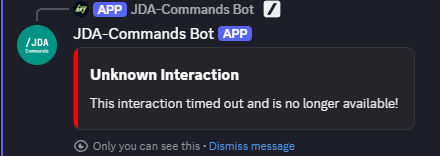
If you want to avoid this behavior, you have to reply with action components that are runtime-independent. They will create a
new Runtime everytime they are executed. These action components will even work after a full bot restart! If you want them to not be usable anymore you need to remove
them on your own.
Info
Modals cannot be independent because they always need a parent interaction that triggers them!
Dynamic Components
Just like with Modals, you can dynamically modify components too. Use the Component#enabled(Class, String, Entry...)
class to access a builder object, which wraps the JDA builder. Alternatively, you can access the native JDA builder by
calling #modify.
Example
Components V2
Note
This section assumes that you are already familiar with Components V2. You can find the Discord documentation here. Also, please have a look at JDAs component classes.
Replying with Components V2
You can reply with Components V2 by passing one or more MessageTopLevelComponents to the
[reply()][[ReplyableEvent#reply(CollectionMessageTopLevelComponent, Entry...)]] method.
This will automatically enable the V2 flag. Note that this method is only available either directly at the event class or at the ConfigurableReply
stage (accessed by calling with()).
Example
Note, that you cannot reply with Components V2 after:
components(...)embeds(...)builder(...)
has been called, because adding content, embeds, files, etc. disqualifies the message from being Components V2.
Action Components
Components V2 also can have action components. They can either be added to an ActionRow or a SectionAccessoryComponent
as part of a Section. You add them by using the
Component class.
Example
Enabling and disabling as well as modifying works the same as explained before.
Tip
You can use [Component#row(String...)] as a shortcut for creating ActionRows.
Subsequent Replies
Once you've sent a Components V2 message it has to remain Components V2. The Reply Configuration rules also apply to Components V2.
Often, you want to keep the original components, but edit some of them. You can do so by calling
reply(ComponentReplacer... replacer).
This method will enforce keepComponents and throw an UnsupportedOperationException if the message isn't Components V2.
Example
To make working with the ComponentReplacer easier, you can assign unique ids to components. For action components, which
are defined by JDA-Commands, you can either use the component annotation (e.g. @Button) or the dynamic components API.
Embeds
JDA-Commands provides a rich Embed API to make working with Embeds easier. See the Embed Section of this wiki for
setup instructions. Once you have your EmbedDataSource
configured you can start using Embeds in your replies.
Use the ConfigurableReply object, which is accessed by calling
ReplyableEvent#with(),
to attach Embeds to your reply. The easiest way of replying with an Embed is to simply pass the Embeds name:
You can also pass multiple names or call the #embed(...) method multiple times:
Example
For modifying you can either use the Embed object or use a callback:
Example
Placeholders can be passed not only to the Embed
object, but also directly to the #embed(...) method:
ReplyConfig
The @ReplyConfig
annotation provides a way to modify the default behavior of your replies. You can either annotate single methods or
entire interaction controllers. For a list of all possible configurations see the InteractionDefinition.ReplyConfig.Builder.
ReplyConfig Annotation
Alternatively, you can set a global reply config at the builder:
Global ReplyConfig
JDA-Commands will apply clashing ReplyConfigs in the following hierarchy:
with()#...callsReplyConfigmethod annotationReplyConfigclass annotation- global
ReplyConfig